Attachments
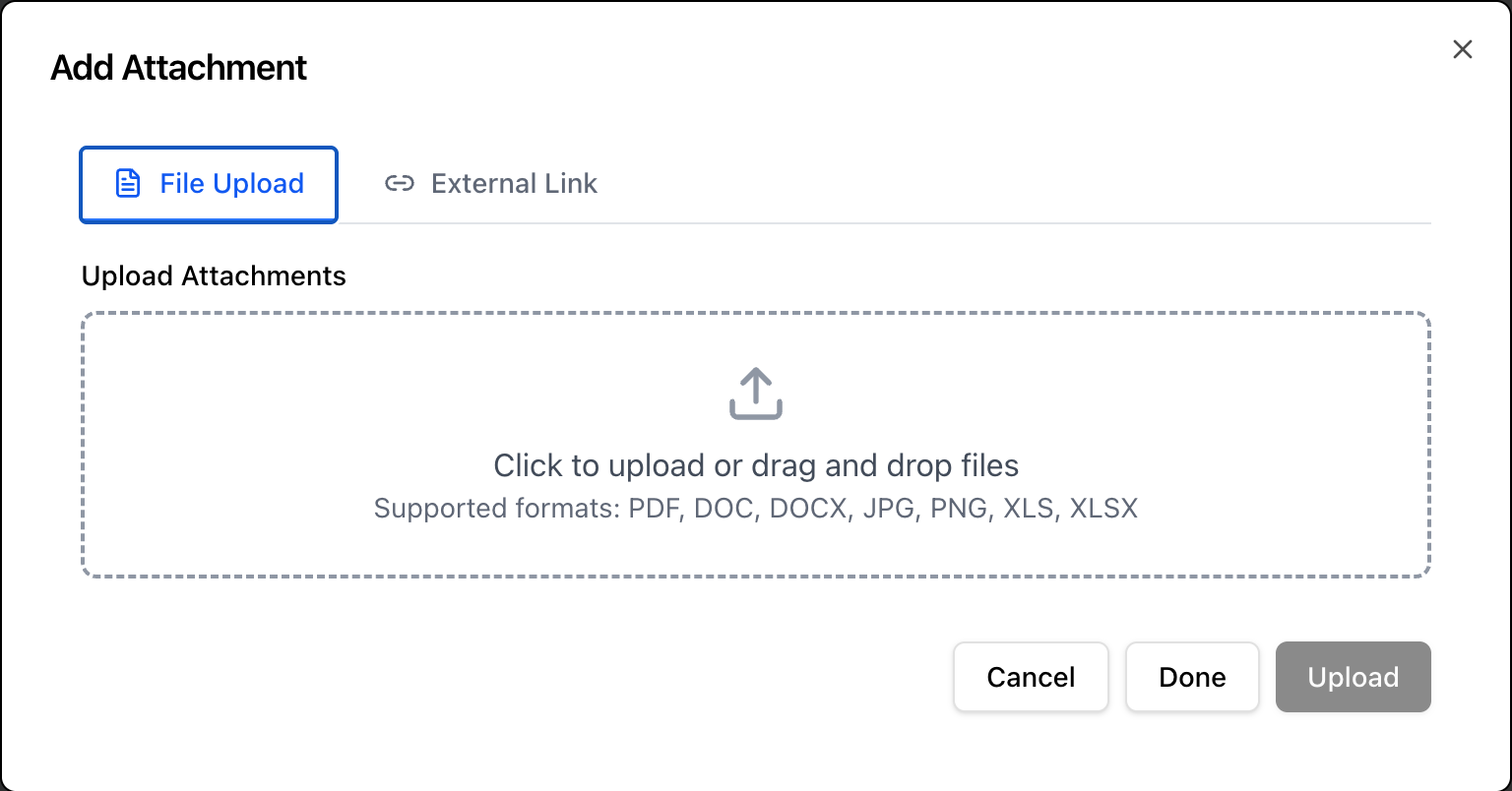 The Attachments component appears within the Add Item dialog for both Change Requests and Tasks. It allows supporting documents, evidence, and externally prepared management products to be uploaded and associated with a specific stage of the change lifecycle.
Attachments serve two distinct purposes in the system. The first is capturing evidence — screenshots, specifications, meeting minutes, or any other supporting material that aids understanding or provides an audit trail. The second is capturing Products - Outputs from a Task or Management Products — documents such as a Business Case, Quality Register, or Risk Assessment that have been prepared outside the system and need to be recorded against the correct stage for approval validation.
Some Products may be kept in codebase stores that manage version control, these can be added as a link to the file in the codebase. Users must have sufficient privileges to access the codebase to add and review these links.
Key Principle: PRINCE2 does not prescribe how management products must be formatted or where they must live — only that the necessary information exists and is available to the people who need it. Uploading an externally prepared document and classifying it correctly is a fully valid way to satisfy a management product requirement, equivalent to using the system’s built-in forms.
Uploading Files
Click anywhere in the upload area (the dashed bordered box) to open a file picker. Multiple files can be selected in a single upload action.
Supported File Types
| Type | Extensions |
|---|---|
| Documents | .pdf, .doc, .docx |
| Spreadsheets | .xlsx, .xls |
| Images | .jpg, .jpeg, .png |
Files outside these types will not be accepted by the file picker. If you need to attach a file in another format, consider converting it to PDF before uploading.
File Limits
Each file must be under 5MB. Files that exceed this limit will not upload successfully.
Uploaded Files List
Once files are selected they appear in the Uploaded Files list below the upload area, showing the filename. Files can be removed before submission by clicking the × button on the right of each entry. Removing a file from this list discards it — it will not be attached to the Change Request or Task.
Note: Files are staged locally until the parent form is submitted. Selecting files and then navigating away or cancelling the dialog will discard the uploads. Attachments are only saved to the record when the containing form is submitted successfully.
Attachments as Management Products
When uploading a document that represents a formal PRINCE2 management product — most commonly a Business Case — the attachment must be classified correctly at the point of upload for the system to recognise it during stage approval validation.
Why Classification Matters
The Approval Bar checks for a valid Business Case before allowing a stage to advance. It recognises two sources as valid:
- A Business Case created directly in the system via the Business Case view, with a lifecycle status of Approved.
- An attachment uploaded and classified as a Business Case for the matching stage.
If a Business Case has been prepared in an external tool — a Word document, a PDF, a spreadsheet — uploading it here and classifying it correctly satisfies the same requirement as using the built-in Business Case form. The stage approval check will recognise it and the Approval Bar will clear the Business Case blocker.
If the document is uploaded but not classified correctly, or is uploaded against the wrong stage, the Approval Bar will continue to show No Business Case and the stage cannot be approved.
Externally Governed Management Products
Some organisations maintain management products in their own systems — document management platforms, SharePoint, project management tools — rather than recreating them inside the change management application. Uploading a PDF export or a document snapshot is the correct way to bring these into the change record.
Common management products that may be uploaded as attachments include:
| Management Product | Typical Use |
|---|---|
| Business Case | Justification document prepared externally, uploaded to satisfy stage approval validation. |
| Risk Assessment | A risk analysis prepared in an external tool, uploaded for reference alongside the Risk Register. |
| Quality Plan | A quality management plan covering the standards and acceptance criteria for the change. |
| Communications Plan | A stakeholder communication plan prepared outside the system. |
| Test Evidence | Test results, screenshots, or sign-off sheets confirming a product meets its acceptance criteria. |
| Supplier Documentation | Contracts, statements of work, or supplier-provided specifications relevant to the change. |
Tip: Where a management product has been prepared externally, upload the approved version — not a draft. The attachment becomes part of the formal change record and will be visible to approvers and auditors. Uploading a draft and leaving it in place without updating it once the document is approved is a common source of confusion at stage reviews.
Attachments on Tasks vs Change Requests
Attachments can be added at both the Change Request level and the Task level. The stage they are associated with determines where they appear in the Change Request Details view and whether they count towards stage approval validation.
Change Request level attachments are associated with the overall change and a specific stage. They appear in the attachments section of the relevant stage accordion in the Change Request Details view.
Task level attachments are associated with a specific task within a stage. They appear within the task detail and are also accessible from the Change Request Details view under the relevant stage. Test evidence, work outputs, and task-specific reference material is best attached at the task level to maintain clear traceability between the work done and the evidence of its completion.
When in doubt, attach documents at the level that reflects where the work was done:
- Evidence of a specific task being completed → attach to the task.
- Stage-level governance documents (Business Case, Quality Plan) → attach to the Change Request at the relevant stage.
Attachments and the Audit Trail
Every attachment associated with a Change Request or Task is retained as part of the permanent change record. Attachments cannot be silently removed once a stage has been approved — this preserves the integrity of the audit trail and ensures that the evidence that supported an approval decision remains accessible after the fact.
When reviewing a closed Change Request, all attachments from all stages are available, providing a complete documentary record of what was produced, what was uploaded as evidence, and what management products were approved at each stage boundary.