Overview of a Change Request
Introduction
This is an overall guide to how a Change Request flows through the stages and is controlled by smallChange. It will highlight how and where smallChange aligns with PRINCE2 and where it doesn’t.
Change Request Lifecycle
A Change Request (CR) in smallChange follows a structured lifecycle — from initial creation through to closure and archive . Each step in the process flow below is explained in further detail.
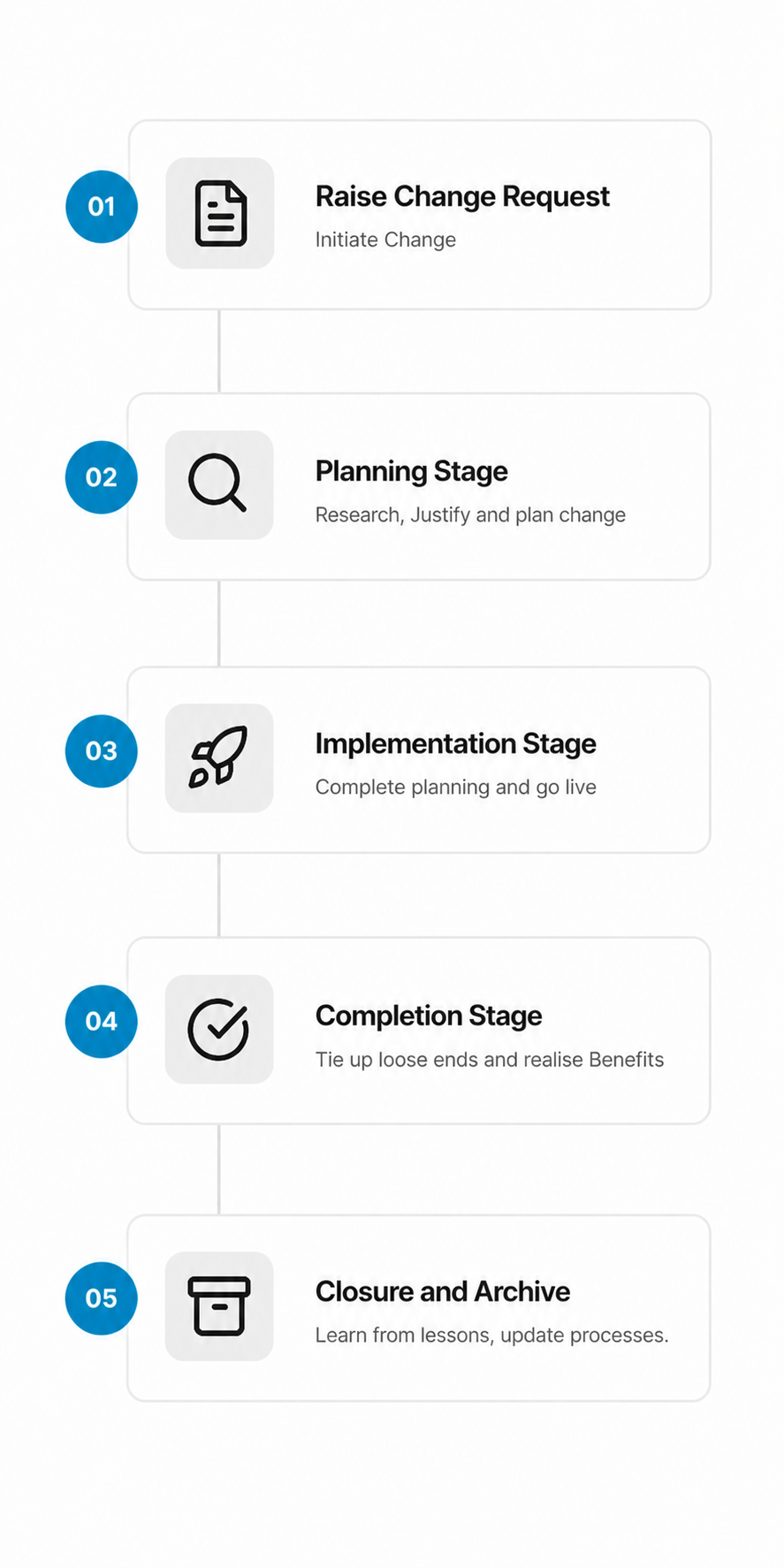
1. Raise Change Request
A team member identifies a need for change and submits a Change Request. At this stage they capture:
- A clear description of the proposed change
- The reason or driver for the change
- The category (e.g. scope, quality, timeline, cost)
- The priority (e.g. low, medium, high, urgent)
The CR is assigned a unique reference number and its status is set to Change Requested.
Note
At this stage it is not a requirement to complete a Business Case or Risk Analysis, although should the raiser have enough information to complete these, they should be completed. They are both living documents that can be updated as the Change Request progresses. Each subsequent stage must have these documents.
2.1 Review
While technically not a stage, once submitted for review, the Change Request is reviewed to ensure that it aligns with organisation’s purpose or objectives, and that it is feasible and beneficial. The Change Request is reviewed by the Change Authority/Change Manager and a decision is made to either:
- Approve — The change is approved and the Change Request is moved to the Planning stage.
- Park — The change is parked and the Change Request is moved to the Parked stage. An Admin can open these at a later date.
- Reject — The change is rejected and the Change Request is moved to the Rejected stage.
In the Review, it may initially be decided that based on current information, the Change Request can proceed to Planning stage. More information may be required to ensure the correct decision has been made. It is suggested that Tasks to gather this information can be noted now and created in Planning stage. If further information comes to light that the Change Request should not proceed, the Change Request can be rejected at the Planning stage. Sometimes it is best to invest time to gain knowledge only to come to the conclussion that the Change Request is not justified.
Note
This is where smallChange deviates from PRINCE2’s guidance on governance by Project Boards and the Executive. Depending on the size of your organisation and its maturity, there may already be processes in place that govern how change is approved, alternatively you may have a Change Manager with the remit of assessing and approving change. How the decision is reached, whether to approve, park, or reject a change is outside the scope of smallChange. What matters, and what is documented, is that a decision was made.
2.2 Planning Stage
The Planning stage is used to complete Tasks that enable a better understanding of the Change Request, considering the effect of the proposed change on:
- Business Case — Does the change align with the organisation’s objectives, does it have justification?
- Schedule — What is the intended date the change will be completed, what is driving this date?
- Cost — Does the Change warrant investment of resources, what are the benefits/disbenefits?
- Quality — What quality products are required, are there any acceptance criteria defined?
- Risk — will the change introduce any risks that may exceed the organisation’s Risk Tolerance?
Tasks are added and can be assigned to the relevant Subject Matter Experts. smallChange provides a framework for creation, approval and revisioning of Business Cases for each stage of the Change Request. However if an organisation has existing processes for Business Cases, these can be uploaded to the secure store and marked as Management Product. This is also true for Quality Approaches/Products. Once the Tasks for planning the Change Request are completed and the appropriate Management Products are created/attached, the stage can be approved. Approval can be done by Approvers, Heads of Departments, or the Change Manager. In the case of Change Manager who has the remit to approve stages, they can approve the stage and choose to ‘notify’ the appropriate people.
Note
At any stage where Approval is sought, an approver may decide that the Tasks are not complete, or the Management Products are not sufficient. In this case, the Approver can reject the stage and Change Request stays at its current stage. A reason must be given so that the Admin/Change Manager can address problem by adding extra Tasks or requesting additional Management Products.
- End Stage Report — A report is created to summarise the stage, review (and update) the Business Case, Quality Products and any other Management Products. Review the Issues, Risks and Lessons. The End Stage report will recommend if the Change Request should proceed or be halted. Depending on organisation structure, the ESR can be used as the Change Managers reassesment of the Change Request or as a report to the Change Authority/Executive.
3. Implementation Stage
Similar to Planning stage, Tasks are added and can be assigned to the relevant Subject Matter Experts. Task that were planned for in the Planning stage can now be implemented. For example: Firmware that was developed during the Planning stage can now be deployed to the relevant devices. Components that were ordered during the Planning stage can now be introduced to the Bill Of Materials. Drawings created can now be released.
Once the Tasks for implementing the Change are completed and the appropriate Management Products are created/attached the stage can be approved.
- End Stage Report — A report is created to summarise the stage, review (and update) the Business Case, Quality Products and any other Management Products. Review the Issues, Risks and Lessons. The End Stage report will recommend if the Change Request should proceed or be halted.
4. Completion stage
Once the Implementation is complete, this is where the loose ends are tied up.
- Was there a change to a product? - Tasks to record serial numbers, Cost roll up, communicate changes to service centers.
- Was there a change to a process or documentation? - Tasks to record training, update Document Log, communicate changes to relevant teams.
- Was there a change due to a standard or regulation? - Task to notify third parties, ensure Quality Manual update complete.
Once the Completion Tasks are complete, the Completion stage, along with any products, can be approved. As is standard, an End Stage Report is created to report on the Changes Request metrics and highlight any problems with the process. As the Change is completed a recommendation to proceed is not required.
5. Closing and Archive
Once the change has been Completed and verified, the CR is marked as Closed. A brief Closing Summary should confirm that the change was delivered as expected and that benefits and disbenefits will be monitored by the relevant parties. The Closing Summary is considered to be the equivalent of the PRINCE2 “End Project Report”, only differing from the End Stage Report in that it is recorded directly against the Change Request.
Issues raised during the process will be addressed during each stage, but a summary is included, so as to be considered at Closing. Risks will also be summarised and may lead to further process refinements or potentially new Changes. Quality The Quality Register for this CR will summarise all Quality activities. Lessons raised during the stages are all addressed. Lessons don’t have to have actions completed but any positive and negative lessons are recorded and can be used to improve the Change Management process.
Change Request Statuses
| Status | Description |
|---|---|
| Change Requested | CR has been created but not yet submitted. |
| Approved | CR has been approved and is awaiting or in implementation. |
| Parked | CR is not relevant at this time, can be re-assessed later. |
| Rejected | CR has been rejected. |
| Closed | CR has been fully implemented and closed out. |
Who Can Do What?
Roles and permissions around Change Requests follow your project’s configuration in smallChange. As a general guide:
- Any smallChange user can raise a Change Request. Depending on licenses, the Request may be made ot the Admin who can then submit it.
- Contributors can be assigned Tasks to complete, raise issues, Risks and Lessons. Create Products and Management Products.
- Approvers can act as Contributors, and approve stages and products. Approvers are usually Heads of Departments or similar.
- Change Authority typically a Project Board or delegated individual with the required knowledge to asses a Change Request.
- Admin or Change Manager, guide Change Requests through their life cycle.