Raise Change Request
In PRINCE2, change control is a fundamental practice that ensures all changes to baselined products are managed, assessed, and approved before implementation. This form captures the essential information required to raise a Change Request (CR) for evaluation by the Change Manager or Change Authority.
Request Title *
Provide a clear, concise, and descriptive title for the change request. This should summarise the nature of the change in a single sentence. A good title enables quick identification and prioritisation during Change Manager review.
Examples: Update login module to support multi-factor authentication or Change supplier of widgets due to cost reduction
Priority *
Indicate the urgency and importance of this change using the following scale:
| Priority | Description |
|---|---|
| High | Critical change requiring immediate attention. Impact of change is high, safety concern, or regulatory compliance if not addressed promptly. |
| Medium | Important change that should be addressed in the near term but does not pose an immediate risk to the project. |
| Low | Desirable improvement that can be scheduled when resources permit. |
Note: Priority assists the Change Manager in applying the Manage by Exception principle, ensuring that only changes aligned with organisational priorities proceed.
Category *
Classify the change according to its primary domain. The default are below, your Admin can add custom Categories as required.
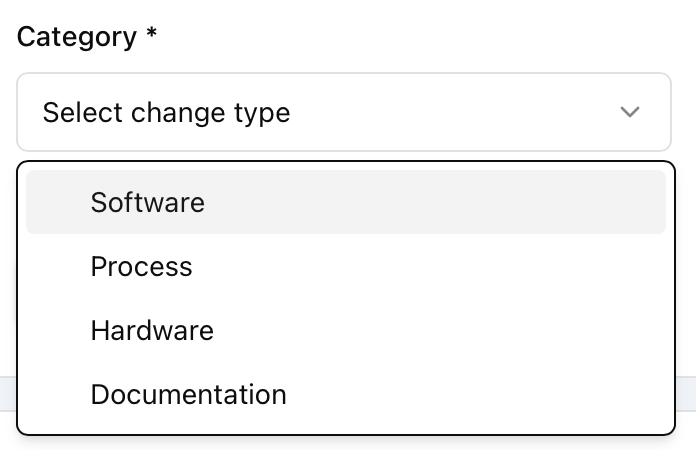
| Category | Description |
|---|---|
| Software | Changes to application code, configuration, or system behaviour. |
| Process | Changes to operational procedures, workflows, or business practices. |
| Hardware | Changes to physical equipment, infrastructure, or components. |
| Documentation | Changes to specifications, SOPs, manuals, or other controlled documents. |
Sub Category *
Further refine the classification based on the selected Category:
Software:
- Bug Fix — Correction of a defect in existing functionality.
- Security Fix — Addressing a vulnerability or security concern.
- Feature — Addition of new functionality or enhancement.
- Version Update — Upgrade to a new version of software or library.
Process:
- New Process — Introduction of a previously undefined procedure.
- Quality Concern — Addressing a deficiency in quality standards.
- Improvement — Enhancement to an existing process.
- Safety Concern — Addressing a health or safety risk.
Hardware:
- Quality Concern — Defect or deficiency in hardware or components.
- Component Change — Replacement or modification of a component.
- Design Change — Alteration to hardware design or specifications.
- Supplier Change — Change of vendor or supply source.
Documentation:
- Correction — Fixing errors or inaccuracies in existing documents.
- SOP — Creation or revision of a Standard Operating Procedure.
- Guidance — Updates to guidance material or reference documentation.
Requested By
This field is auto-populated with your username. It identifies the originator of the change request for traceability and follow-up.
Target Implementation Date
Select the desired date by which this change should be implemented. This is an indicative target and may be adjusted during assessment based on resource availability, dependencies, and project schedule constraints.
Note: The target date should align with the current Stage Plan tolerances. If the requested date falls outside approved tolerances, escalation may be required.
Description *
Provide a detailed description of the proposed change. Include:
- What is currently happening (the as-is state)
- What should happen after the change (the to-be state)
- Any relevant context, error messages, or observed behaviour
Unknowns are acceptable — this form is designed to capture changes at the point of identification, and details can be refined during the Planning stage.
Justification *
Explain why this change is necessary. Consider:
- Business drivers or stakeholder needs
- Risks of not implementing the change
- Regulatory, compliance, or contractual obligations
- Alignment with project objectives or benefits realisation
Note: This field maps to the Business Case justification. Every change should demonstrably support the project’s defined benefits or address a threat to them.
Expected Impact
Describe the anticipated impact of implementing this change. Consider:
- Scope: Will this affect project deliverables, products, or boundaries?
- Schedule: Will timelines or milestones need adjustment?
- Cost: Are there budgetary implications (effort, licensing, procurement)?
- Quality: Will quality standards or acceptance criteria be affected?
- Risk: Does this introduce new risks or mitigate existing ones?
- Resources: Are additional skills, personnel, or tools required?
If the full impact is unknown at this stage, indicate that — a formal Impact Analysis will be conducted during the Assessing Issues process.
Attachments
Upload supporting documents, screenshots, logs, diagrams, or any other relevant evidence that aids the Change Authority in understanding and assessing the request.
- Click Upload Documents to select files from your device.
- Attachments are associated with the Change Request number upon submission.
- Supported formats: PDF, images (PNG, JPG), documents (DOCX, XLSX), and text files.
- File limits are 5Mb
Note: Attachments form part of the Change Request record and should be sufficient to enable the Change Authority to determine the appropriate course of action without requiring additional clarification.
Submission Workflow
- Complete all mandatory fields (marked with *)
- Review the information for accuracy and completeness
- Click Submit Request to lodge the change
- The Change Request will enter the Change Requested stage for assessment